

Drupal@Urban
The Urban Institute designs, builds, and maintains an increasing number of Drupal websites. Drupal is an open-source content management system (CMS), written in PHP. When we need a CMS-based site, we prefer to use Drupal.
Drupal is an important tool in our communications toolkit — for all the specialized applications, API’s, and visualizations we highlight on Data@Urban, the “bread and butter” actions of publishing research publications, blog posts, and features is handled through Drupal.
Urban’s flagship site, is a Drupal instance, as is the Tax Policy Center’s site. Many of our project and program sites are also implemented with Drupal, such as Greater DC, Policies for Action, and Next50. How Housing Matters (HHM) is not a Drupal site. It is currently a WordPress (WP) site, but we are in the process of fixing that….
A basic WP to Drupal 8 migration is simple. In fact, as with most things Drupal, “there’s a module for that.” The module does require a bit of configuration that involves setting up a database connection to the source site, otherwise it will migrate WordPress “posts” to Drupal “nodes” (as well as taxonomies and featured images) out of the box.
Migrating WordPress Advanced Custom Fields (ACF) “repeater fields” into Drupal paragraphs entities is trickier than it is hard. It took me a few more hours than I’d like to admit, but I learned a few things along the way. Hopefully, this post will shave a few of those hours off your migration journey . This is the post I desperately sought and never found.
Migrate API
Drupal has a Migrate API that leverages a Plugin API. This makes migrating content and assets (files, images, and so on) remarkably easy. The architecture described in those last two links allows for unlimited customization and transformation. Drupal 8 was designed from the ground up with migration in mind. If you want people to move to Drupal, you need to make the moving easy. Having migrated countless sites to and from any number of systems, rigs, and files over the years, I can’t say enough about Migrate API. Dig in here if you want to catch up.
Custom migration module
As referenced above, the Drupal community has generously provided an excellent contributed module to handle simple WP-to-Drupal migrations. WP Migrate is well written and nicely documented. It won’t handle complex migration cases out of the box, but it will give you an excellent starting point. Our own module, Urban HHM Migrate, began life as a WP Migrate clone, but it quickly became our own.
Our module architecture reflects common design patterns for custom migrations; each migrated Drupal entity type has a dedicated configuration file (Migrate Plus makes this possible and is required for our module to be of any use) and custom source and process plug-ins.
Each source plug-in provides a query to retrieve the relevant incoming records and any necessary custom code we need to massage WP data into something resembling a Drupal-friendly structure. The custom PHP shown below exists in source plug-in files.
Here is the basic directory structure, which I’ve truncated to include only files discussed in this post:
Even though we have a custom source for each migrated entity, some functionality is shared among multiple sources. To accommodate, we extended the SqlBase class and included common utility methods there. Here is what HhmSqlBase looks like:
I’ve truncated this file to remove as much irrelevant code as possible. I left in anything referenced or used in examples further down this page.
We will look closer at this file (and others) later. Before we do that, let’s zoom out a bit and establish some context.
Migration strategy
On the surface, ACF repeater fields and Drupal paragraph entities serve the same purpose . They both provide a content editor or administrator with structured collections of fields to be displayed on a given page or post. Both also support multiple values, so they are great for repeating sets of content. The HHM team posts a weekly news roundup of relevant stories from external sites. Each roundup usually contains four to six news items. Each news item contains the following fields:
• headline (plain text)
• description (formatted text/HTML)
• sources (multiple links, each of which contains two fields)
– link text
– link URL
The editor experience is essentially the same. When creating a news roundup post (“node” in Drupal-speak), the content editor can add as many news items as necessary. The result is a list of structured content sets (often referred to as “cards” in front-end speak) that can be styled as needed. Given the similarities in both editor and end-user experience, the architectural strategy of migrating from ACF repeater field to Drupal paragraph is a no-brainer.
So similar, and yet not similar at all
Now, the fun part. WordPress and Drupal store field data very differently. WordPress stores every field in a single table; the wp_postmeta table. Drupal creates a new table for each field base. Which is better? Depends on what you need and who you ask. I’ll resist the urge to offer a sweeping opinion, but I will say the Drupal architecture provides an extra layer of structure that more closely aligns with the content model seen by the author and end user.
Because all field data are stored as key/value (meta_key/meta_value) in WordPress, ACF multivalue fields are indicated by appending a “delta” (Drupal-speak for “index”) value to the meta_key field. This can make field value retrieval laborious. WordPress API eases this burden by providing utility functions and classes (such as WP_Meta_Query). They work great but aren’t available outside of WP. This means you need to write some queries, but you can’t do that until you know what to query. You can find the meta_key for any ACF field from the WordPress admin dashboard. With repeater fields, the machine_name/key provided is only the “base” string. Here’s what ACF repeater meta_keys look like:
• repeater_field_name (number of repeater items)
• repeater_field_name_[delta]_sub_field_name
• repeater_field_name_[delta]_sub_field_name_[delta]_sub_sub_field_name
Let’s migrate some paragraphs!
Once you’ve determined the meta_key pattern for your ACF repeater fieldset, you are ready to build your paragraph migration. As with other Drupal migrations, you want to migrate the child entities first, followed by the parent entities. This preserves the relation between parent and child across platforms. So when you need to roll back (I said “when,” because you WILL need to roll back and you WILL want this to be easy and predictable), you can do exactly that.
By now, you’ve surely noticed that ACF repeaters are little more than key|value combinations with similar names and a common delta and post_id (wp_postmeta uses the post_id column to relate these values to a given post). The code below gathers each “set” of repeater field values and creates a paragraph entity for each one. Later on, you’ll run the actual post-to-node migration and relate each migrated paragraph item to the correct parent node.
Here is my migration config for the news item paragraph entity:
Note that we use the “sub_process” process plug-in to handle the relation of our incoming source_links array.
And here is the custom source plug-in:
Let’s look closely at the most important bits.
The main query
Because every repeater set definitely has a headline, we use that for our base query. Alternatively, we could change this to look for results where meta_key = “weekly_news_repeater.” This removes the need for the extra “LIKE” handling in this query. In that case, this query won’t return any “content” data (just numbers), so you’d need to grab the headline in a prepareRow() method in this same class. I found it helpful to preview some content in the results while testing the query. This worked for me. You do you.
Whatever you come up with, you’ll need to write it the “Drupal way,” which, in this case, means you will write a dynamic query. It’s fairly intuitive and well documented. That said, going from raw SQL to dynamic query requires a little patience.
I had to go directly to the database to figure out how ACF stored repeater fields. I used a desktop application to connect and inspect the source WP database. Sequel Pro is my go-to, but use what you like. Here’s what the above query looks like in plain old SQL:
Here is what that looked like on my desktop.
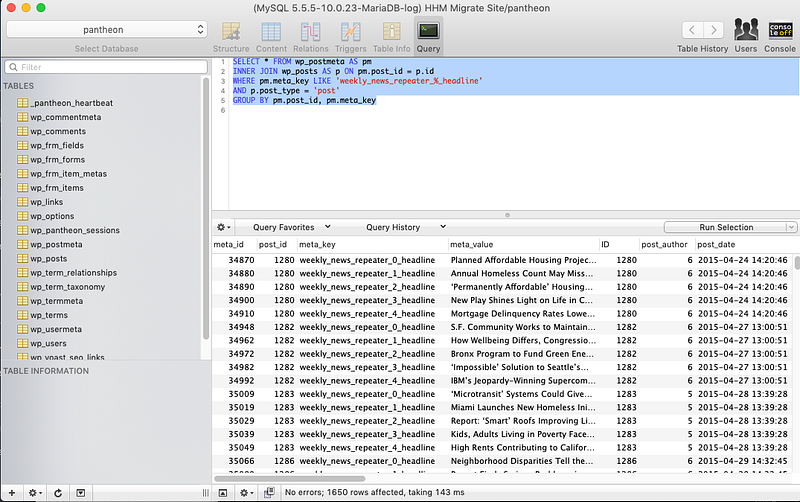
If you take nothing else from this post, remember the value of reviewing and querying the source data directly before diving right into your dynamic query. Be nice to yourself. Debug one thing at a time. Get your query right, validate the results, THEN shoehorn that thing into the proper format. I used drush migrate-status to check the number of results returned from my Drupal query. When the counts align, the query is closer to fine.
Source fields:
Don’t forget to include any additional source fields you plan to insert in your prepareRow() method. This makes your prepared values available to the source configuration.
Handle the repeater values
See source_links and body_text up there? Where does that come from? Simple — we made it up (sort of). In order to import the relevant values into fields in our paragraph entity, we need to rearrange them into an array. This requires some custom methods. The following functions work together to return a repeater value. The arguments are the meta_key name we want to retrieve, deconstructed. I did this to make it easy to iterate through multiple repeater values (where the delta is within the name string). A more robust approach might use pattern-matching to simplify $prefix, $suffix, and $delta into $meta_key. The following snippets are from HhmSqlBase.php, because I anticipated needing it for other fields in this migration. They would work just the same if they lived in NewsRoundupGraphs.php.
I made some effort to abstract this function to work with any repeater field. This is helpful when you have several different ACF-to-paragraphs to migrate. I only had one, so I chose not to spend a ton of time working on pattern matches to find the delta within each meta_key string. Instead, I provide the delta position as an argument and use a separate utility method to return the delta value. Could be slicker, but this does the job.
The getRepeaterValue() method queries and returns a single value, but we can use it to grab both single value and multivalue fields. For the body_text of each new paragraph item, we know there is only a single value, so we use it like so:
The link fields present an additional challenge. In addition to being a more complex field type (title and URL), we must also account for multiple values. So yeah, that’s a repeater within a repeater. Good times (eye roll). Don’t fret, this is a migration. It only needs to work for our specific use case. Stop Googling “recursive function best practices” and build off the work we’ve already done. That’s what I did, and it looks like this:
For the “subrepeater” I used getRepeaterValue() to find the total number of values so I could easily iterate through the subfields. This approach might break down if the content model called for yet another level of repeaters.
Now we just need to add our prepared values to the source row.
And done! This migration is ready to run. Because this migration only creates paragraph items and we still need to migrate and relate the parent node, we don’t have a simple way to view or spot check the new paragraph entities from the Drupal UX. You could create a quick utility view, but I am lazy, so I looked directly at the relevant tables in MySQL.
Migrate the parent node and bring the whole room together
Once you’ve confirmed the existence of your newly migrated paragraph entities, you are ready to migrate and assemble the parent nodes. I was planning for this to be a bit more straightforward than it turned out to be, but the paragraphs module adds a minor wrinkle. Much of paragraphs’ magic comes from its dependence on the entityreference revisions module. In addition to storing an entity relation target_id, this module also uses a target_revision_id. To correctly relate paragraphs to nodes, you need to provide both values. This post gave me most of what I needed to tie it all together. The code that follows is not much different than the solution provided there. Here’s how I made it work for me.
Node migration config
Here is our news roundup configuration:
Take a look at field_news_items on line 42. Looks simple, right? That’s a good sign there is more beneath the surface. Where does “news_items” come from? Let’s take a look at NewsRoundups.php .
See? Not much different at all. The query is mostly the same as the one we used in getRepeaterValue(). For each result, we use the relevant migrate_map table to find the related paragraph entity and build an array of values, which is inserted to the source row as news_items.
That’s it. That’s how I migrated WordPress ACF fields to Drupal 8 paragraph entities for the How Housing Matters website. I hope you find this useful. Even better, I hope you find ways to improve on this and let me know.
Regrets, I’ve had a few
In drafting this post, I was reminded of the reason why I’ve always resisted authoring how-to articles. I have trouble looking at my code without feeling a need to tweak, modify, and improve upon it; make it cleaner and faster and more clearly documented. (“That was a month ago. I was just a child then!”)
I still need to do those things, because we all do, right? Let’s add some to-do items:
• In Drupal 9, db_select is deprecated and will be removed. For long-term compatibility, use a proper dynamic query or the Migrate API directly. Alternatively, you may be able to eliminate this bit of custom code by combining the sub_process and migration_lookup process plug-ins (similar to how you might handle any complex or multivalue field). In my case, I still needed this query, and I found it faster to code and debug this way.
• If I had several paragraph fields, I’d definitely improve on all of the above by eliminating redundant code and making the source field name meta_keys configurable.
• Although this is a custom source plug-in, I suspect the getRepeaterValue() method (modified, of course) could be useful as a stand-alone process plug-in.
Sources and inspiration
Here are some posts and documents I leaned on while building this migration.
• “Drupal 8 Migration with Multiple Paragraph References” by Joel Steidl
• “Migrating Paragraphs in Drupal 8” by Joel Travieso
• “Getting Started with Drupal 8 Migrations” by Joel Steidl
