

Agentic AI tools—systems that can take autonomous action and execute multistep workflows independently of user inputs—offer a new way for our team at the Urban Institute to reach researchers, policymakers, and practitioners with our technical assistance, data, and tools. But these tools’ added power also carries additional risk.
In our previous work, we built and evaluated nonagentic, generative AI tools’ ability to provide answers that help users navigate and synthesize resources from Urban’s Upward Mobility Initiative (UMI). Here, we extend that testing of AI tools’ ability to interact with UMI resources by exploring whether a narrowly scoped agent can outperform nonagentic systems when tasked with solving a well-defined problem with clear instructions and guardrails.
About the Upward Mobility Data Dashboard
The Upward Mobility Data Dashboard provides Mobility Metrics across the past decade to help people understand key conditions that affect upward mobility. The dashboard includes 24 predictors across more than 3,000 counties and 480 cities. For example, a local leader interested in how the cost of living affects upward mobility in Richmond City, Virginia, can compare the jobs paying a living wage metric against peer communities.
The UMI Dashboard offers a tailored data resource for local leaders, in part because its development included experts and extensive user-experience testing. As such, an AI tool isn’t meant to replace the dashboard but to complement it. We want to direct more users to the dashboard and leverage its capabilities without losing any nuance. To do so, we sought to build an AI chatbot that can offer an accessible entry point for users unfamiliar with the dashboard and directly link to the most relevant view.
Fortunately for our efforts, the dashboard was built using deep linking. Every configuration maps back to a unique URL consisting of a base URL, location IDs, and predictor IDs, meaning that any dashboard view can be recreated using straightforward rules a large language model (LLM) can learn with proper instructions. For example, the following URL links to jobs paying a living wage for Richmond City, Virginia, with a comparison community of Baltimore City, Maryland:
https://upward-mobility.urban.org/dashboard/results?location_ids=51760%2C24510&predictor_ids=AccessToJobsPayingALivingWage&LivingWage_metric_id=LivingWage&LivingWage_variable_id=ratio_living_wage&LivingWage_year=2024
Creating Custom URLs With Generative AI
Our initial approach was to provide generative AI tools with detailed instructions about the URLs, dashboard, and data through a system prompt. But turning plain text into a prespecified list of counties includes many edge cases that make it easy to exhaust the user with follow-up questions or make assumptions that ignore smaller counties and cities.
For example, if Bart Simpson were interested in median wages in Springfield, which Springfield would he want? Our database contains Springfields in Illinois, Massachusetts, and Missouri. What about Richmond City, Virginia? Technically, Richmond City is a county and is easy to confuse with Richmond County, Virginia (also a county), which is more than an hour away.
To test different issues like these, we built a set of 97 example cases, including those in the table below:
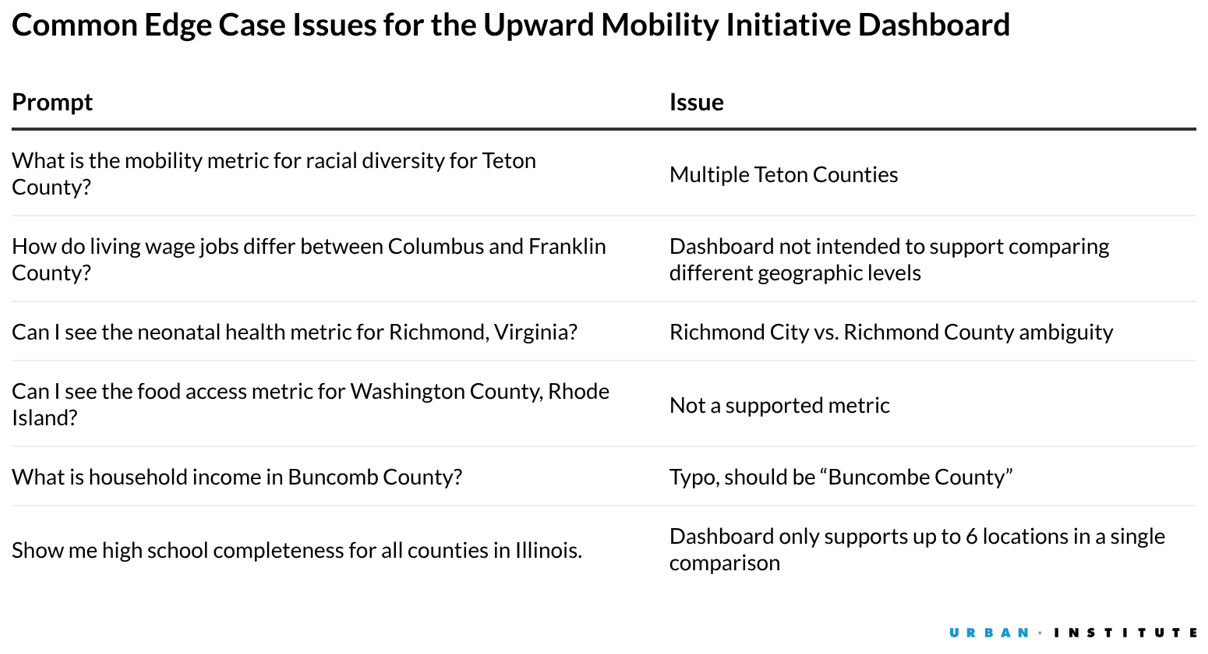
As we built out the system prompt, we included an instruction for the chatbot to respond “I have insufficient information to respond to the prompt” if there was any ambiguity about the geography.
We then built a testing environment in R that can access Amazon Web Services’ (AWS) Bedrock using the ellmer R package, which provides an easy interface for calling and interacting with LLMs. We tested a range of models, including Meta’s open-weight Llama 3.2-1B Instruct model and Anthropic’s Claude Haiku 3.5 and Sonnet 4.5.
The results were very disappointing: Lightweight models almost never refused to respond when provided ambiguous geographies, instead making subjective decisions that a user may not have intended (e.g., defaulting to the larger geography). More sophisticated models swung too far in the opposite direction, often refusing to respond even when the geographic instructions were clear.
Finally, we tried lengthening the instructions. But this proved unwieldy, as there was too much information to include, and the models started ignoring parts of the system prompt. These issues of “lost in the middle” context (PDF) and diminishing returns of too many distinct instructions are well-studied in the AI literature.
Moving to a More Robust Agentic Approach
Though thoughtful system prompting can lead to the desired answer in many cases, the number of idiosyncrasies with US geographic units requires a more reliable method. We wanted to test if an agentic approach could solve our problem more flexibly and accurately.
To build our agent, we first had to create its capabilities, which included both skills and tools. Skills provide an agent with specialized knowledge and instructions for a particular task, while tools provide the agent with reliable actions it can take to carry out that task.
In our single-agent example, we wrote a skill to be employed identically to a system prompt: a set of underlying instructions and information passed to a model that guides its responses. Our complete skill is reproduced in this Gist:
https://gist.github.com/judah-axelrod/d5633fbf54c4432cabdaa60a97bb0655
The real power of an agentic model became apparent to us with tools. The most significant issue in our nonagentic AI version was translating a user’s query to the correct geography given ambiguity. Our tool solved this issue through a deterministic Python function called `lookup_geography`. We loaded all valid county and city names, parent geographies, and Federal Information Processing Standards (FIPS) codes supported by the dashboard into a Python dictionary as the source of truth. The tool then executes the following steps:
- The tool accepts a location name to search for—as parsed by the agent from the user’s query—and optionally, the geography type and state if specified.
- The tool searches against the valid geographies in the dictionary and gives any exact matches top priority, followed by substring matches (e.g. “Cook” for “Cook County”), and finally, fuzzy matches to handle typos in the query.
The complete function (and helper functions) are documented in this Gist: https://gist.github.com/judah-axelrod/0f1fd29903037b0ee1a1591a20068d5f
Along with this function, we also created a tool schema, a dictionary or JSON file that lists the valid tool names, descriptions of when and why to invoke a tool, and valid types of input parameters. This allows the model to understand precisely how to parse a user’s input and convert it into the right call of the `lookup_geography` tool.
Our Setup
The agent, accessed through AWS Bedrock’s Converse API, combines the above capabilities into something truly useful. Upon setup, we pass the skill file and tool schema to provide global context to the agent. Armed with this information, the agent enters a conversation loop.
Illustration of Agentic Conversational Loop
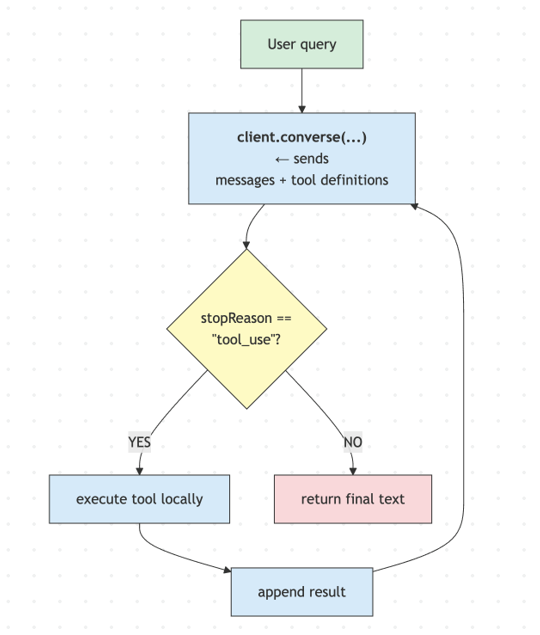
With each pass through the loop, the agent views the entire context window of the conversation, including the skill and any prior messages from the user. The agent then communicates its next step through the stopReason field. In this case, the stop reason entails a tool call (i.e., it needs more information about geographies to construct a valid dashboard link), a clarifying question to the user, or the desired URL to the dashboard view that answers the user’s question.
This setup has several advantages. First, the agent can call a tool multiple times within the same question, which is crucial for queries asking about multiple geographies. Second, every time a stop reason is reached or a follow-up question is asked by the user, that content is appended to the conversation, enabling the agent to handle repeated back-and-forth.
What We Learned
Agentic AI handled our edge cases gracefully, a major improvement over generative AI.
Although we have not yet rigorously evaluated this agent the way we did with genAI tools that pull directly from our knowledge base, the early results indicate that all the edge cases that a nonagentic system failed to catch were solved by our agent. The agent successfully parsed geographies in user requests, looked them up against valid geographies, understood which questions were ambiguous or unsupported, and asked for clarification in follow-ups to the user when necessary.
The key was not smarter AI models, but better integration of expert knowledge into a technical workflow.
Crucially, the problems with our nonagentic implementation were not solved by a more intelligent LLM. Just as in our previous work with UMI resources, the most powerful model we used through AWS Bedrock was Claude Sonnet 4.6. The difference was the set of structured capabilities that we provided the LLM. The use of cheaper models also minimizes future hosting costs.
Through years of work assembling the Mobility Metrics data and the dashboard, we knew what types of linkable views provided the most value, and exactly where things could go wrong. We were able to encode those examples, with clear instructions on how to handle each one, in our skill file.
Our `lookup_geography` tool provided a structured pathway for the LLM to find and parse the correct data. This type of pattern illustrates why standards like a Model Context Protocol, which grants AI systems structured access to authoritative data at scale and which Urban is actively developing, have gained traction in the public sector.
Our conversational loop was the right structure to balance model agency and risk.
By using a conversational loop, we empowered the LLM to work until certain conditions were met, rather than just asking for a one-off, chatbot-like response. This setup gives us as researchers and data scientists all the power. The model decides which tools to call, when, and how to interpret results, but we decide what tools to create, what they can and cannot do, and when to stop. The model might see “Richmond” appear in a query and decide how to turn that into a valid tool call, but we create the schema it used to do so, and importantly, the tool we built will return vetted, nonrandom results to the model every time.
Looking Ahead
We now have the building blocks in place to create specialized subagents with more niche knowledge of their specific tasks (e.g., pulling in evidence from a knowledge base or directing users to a custom dashboard view). This foundation allows us to keep instructions leaner, a feature that will only become more important as we move toward positioning the Upward Mobility Initiative as a single front door for AI-supported mobility training and technical assistance.
